Ultimate 9
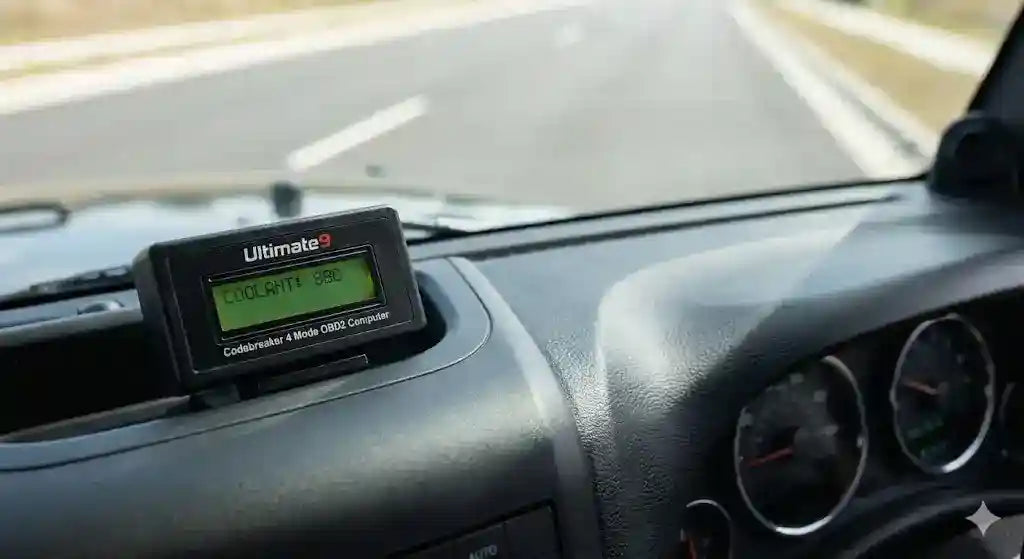
Ultimate9 Codebreaker 4 Mode OBD2 Computer
Ultimate9 Codebreaker 4 Mode OBD2 Computer
Couldn't load pickup availability
Built for the Bush, Backed by Experts
Built for the Bush, Backed by Experts
- Genuine Local Support: We aren't just a website; we’re 4WD enthusiasts based in Surry Hills, NSW.
- Free Australia-Wide Shipping: We ship every order across the country at no extra cost to you.
- Fitment Guarantee: We only stock gear we’ve tested on our own rigs to ensure it fits your Toyota perfectly.
- Trusted AU Business: Proudly Australian owned and operated with a verified ABN: 83 685 124 949.
Know Exactly What Your Engine Is Doing.
Stop guessing why that "Check Engine" light is on. The Ultimate9 Codebreaker 4 Mode Computer is your personal mechanic, co-pilot, and data logger all in one compact unit.
Plugging directly into your vehicle’s OBD2 port, this powerful tool lets you monitor real-time engine data, track fuel economy, and diagnose faults without visiting a workshop. Whether you are towing a heavy load and need to watch your coolant temps, or you just want to clear a false alarm code on the tracks, the Codebreaker gives you the power to do it yourself.
The 4 Modes Explained
1. Digital Gauges (Live Monitoring)
Turn your dashboard into a cockpit. Display up to 4 live parameters simultaneously, including:
- Engine Coolant Temperature (Critical for towing)
- Vehicle Speed & RPM
- Battery Voltage
- Fuel Rail Pressure & Intake Manifold Pressure
- Note: Available parameters depend on your specific vehicle's sensors.
2. Scan Tool (Diagnostics)
Save money on diagnostic fees.
- Read Codes: Instantly see why your "Check Engine" light is on.
- Clear Codes: Reset the light and clear fault codes after a repair or a false alarm.
- Freeze Frame: View a snapshot of engine data at the exact moment a fault occurred.
3. Trip Computer
Perfect for touring. Track your journey with precision:
- Average Speed & Maximum Speed
- Driving Distance & Time
- Fuel Consumption & Distance to Empty
4. Data Memory
Review your vehicle's history. The unit saves up to 300 hours of driving data, allowing you to review trip logs, extreme acceleration/braking events, and long-term fuel economy stats.
Compatibility Guide
This device works with OBD2 Compliant vehicles. In Australia and New Zealand, this generally includes:
- Petrol Vehicles: Built from 2006 onwards.
- Diesel Vehicles: Built from 2007 onwards.
- Installation is 100% Plug & Play via the OBD2 port under your dash.
Features & Specifications
- Display: Back-lit, 2-line x 16-character LCD (Clear visibility day & night).
- Mounting: Includes Velcro mounting strips for easy dashboard placement.
- Power: Powered directly from the OBD2 port (no batteries required).
- Dimensions: 126mm (L) x 41.6mm (W) x 26.6mm (H).
- Updates: USB port included for future software updates.
View our full range of Ultimate9 Products here
Cruiser Store is your destination for premium 4x4 upgrades.
Return to Home Page
Frequently Asked Questions
What exactly does the CodeBreaker 4-Mode OBD2 Computer do?
The CodeBreaker is an advanced diagnostic tool that plugs into your vehicle's OBD2 port. It provides four essential modes: clearing diagnostic trouble codes (check engine lights), real-time engine data monitoring, performance testing, and system scanning to help you identify and manage vehicle issues without needing a trip to the mechanic.
Is it compatible with my Toyota LandCruiser or Hilux?
Yes, the CodeBreaker is compatible with most vehicles equipped with a standard OBD2 port, which includes the vast majority of modern Toyota LandCruiser and Hilux models. It is designed to work seamlessly with factory-standard vehicle protocols.
Can I use it to clear check engine lights?
Absolutely. One of its primary functions is to read and clear diagnostic trouble codes (DTCs). If you have a warning light, the CodeBreaker will show you the specific fault code, allowing you to troubleshoot the issue and clear the light once the problem is resolved.
Is it easy to use for someone who isn't a mechanic?
Yes, the device is designed with simplicity in mind. It features an intuitive interface that makes it easy for enthusiasts and everyday drivers to access information. You don't need expert technical knowledge to perform basic diagnostics or monitor your engine's vitals.
Will this device drain my vehicle's battery?
The CodeBreaker is designed to be power-efficient. When not in use, it draws negligible power. However, it is always best practice to unplug any OBD2 device if you are leaving your vehicle stored for an extended period, just as a precaution.